Native app storyboard

Every core mobile interaction, mapped screen by screen.

This is a local review board for annotating the iOS app journey in the Codex browser. Each frame is tied to the actual Expo Router route and source file from the app repo.

App source checked

Source of truth: /Users/macair/bt-app-ios. The visual phones below are storyboard review mocks, with current screenshot assets used where available.

16

annotatable frames

6

interaction chapters

5

mapped user flows

Recommended app preview order

1

Home opens on Daily Pulse and the bonsai.

2

Pulse answer is sealed privately.

3

Reveal unlocks together.

4

Garden Storyboard advances into Travel.

5

Date Shop or partner opportunity opens.

6

Bestie/Ace Co-Pilot handles context, voice, and send.

7

Week Together closes the loop.

Native tab bar

Home
AI Coach
Explore
Chat
Profile

Login, onboarding, profile, and settings are included here for full product review, but the strongest public story starts after users are paired.

User flow map

What users see, why they see it, and where each path goes.

Each flow below is written as a reviewable product path: trigger, screen sequence, user action, product reason, implementation touchpoint, and next logical step. The phone strip in each flow shows the actual screens in order; the detailed cards underneath expand those screens into functions and API/data paths.

Flow

First-time user to paired relationship

Trigger

A new TestFlight user opens the app for the first time.

Outcome

The user is authenticated, has selected the relationship mode, and can invite or connect their partner.

User does

Create or restore account.

Why here

Private relationship data cannot be shown before identity is known.

Touchpoint

Supabase Auth session.

Next path

If new, continue to relationship mode.

2/(auth)/onboarding/step0-modeChoose connection mode

User does

Choose partner or friend.

Why here

The app has to tailor copy and rituals to the connection.

Touchpoint

Onboarding state and mode copy helpers.

Next path

Continue to partner/friend invite.

3/(auth)/onboarding/step5-inviteInvite partner

User does

Send magic link or copy invite.

Why here

The app only becomes shared once both people are linked.

Touchpoint

partner_invite_tokens and /api/partner/send-invite-email.

Next path

Partner accepts -> shared Home/garden.

4/(tabs)/indexHome dashboard

User does

Land on today's next best action.

Why here

A new user needs a clear first win, not a menu of features.

Touchpoint

Home state, PulseCard, BonsaiWidget, GardenStoryboardCard.

Next path

Answer today's Daily Pulse.
Flow

Daily Pulse to reveal to tree growth

Trigger

A paired user opens Home and sees today's Daily Pulse.

Outcome

Both answers are revealed, the couple streak updates, and the bonsai receives real growth state.

1/(tabs)/indexHome dashboard

User does

Tap Daily Pulse.

Why here

Home should make the two-minute ritual the obvious default.

Touchpoint

components/pulse/PulseCard.tsx.

Next path

Open pulse modal.

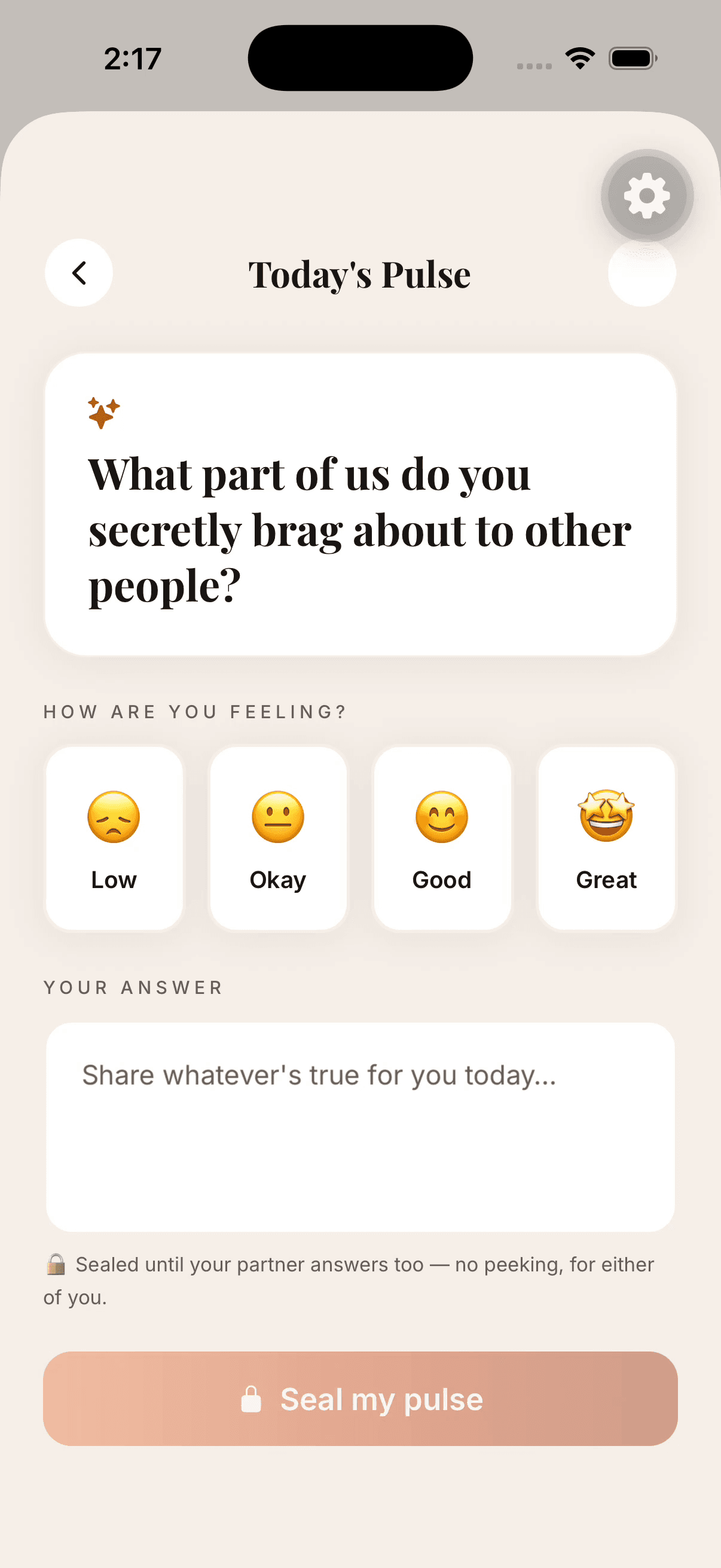
User does

Pick feeling, write answer, seal pulse.

Why here

The answer stays honest because it is private until both answer.

Touchpoint

submitPulse(), pulse_entries, complete_couple_pulse.

Next path

Wait sealed or unlock reveal.

3/(modals)/pulse-revealReveal together

User does

Read both answers together.

Why here

The reveal is the emotional reward and conversation starter.

Touchpoint

pairCompleted, couple_streaks, bonsaiGrowthPoints.

Next path

Refresh bonsai and show growth feedback.

4/(modals)/bonsaiOur Bonsai

User does

Check the living tree.

Why here

The user should see that today's ritual changed the shared garden.

Touchpoint

useBonsaiStore, getBonsaiSnapshot, resolveGrowthFromPoints.

Next path

Return Home or continue into weekly ritual.

Flow

Cup metaphor to weekly watering

Trigger

The couple has built up enough weekly activity for a recap or watering moment.

Outcome

The app connects daily self-work to a shared relationship ceremony.

User does

See the garden loop explained.

Why here

Users need to understand how Pulse, Travel, AI, and Week Together fit one product story.

Touchpoint

GardenStoryboardCard.

Next path

Open bonsai or watering path.

2/(modals)/watering-ceremonyWatering ceremony

User does

Review both cups and press-hold to pour.

Why here

The ritual makes 'fill your own cup, pour together' visual and tactile.

Touchpoint

WateringCeremony and wateringJustLanded.

Next path

Complete ceremony.

3/(modals)/weekly-report and /(modals)/week-togetherWeek Together

User does

Read Week Together.

Why here

The recap gives meaning to the week and points to the next action.

Touchpoint

weekly-report/week-together routes and activity history.

Next path

Return to Home with the next ritual.

Flow

Travel/date intent to sponsor conversion

Trigger

A couple wants a date, trip, gift, or local experience.

Outcome

The couple finds something useful and sponsor engagement becomes measurable.

User does

Tap Travel from the garden story.

Why here

Travel belongs near the front because it is both useful and sponsor-friendly.

Touchpoint

GardenStoryboardCard route into date/travel surfaces.

Next path

Open Date Shop.

2/(modals)/date-shopThe Date Shop

User does

Filter by category, city, or occasion.

Why here

The couple should feel helped before they feel sold to.

Touchpoint

Date Shop, shop engine, analytics events.

Next path

Open an idea or sponsor opportunity.

3/(modals)/opportunity-discoverOpportunities for you two

User does

Save, share, plan, or redeem the offer.

Why here

This gives sponsors intent-based placement instead of generic impressions.

Touchpoint

Opportunity carousel/card and app_events tracking.

Next path

Redeem, plan, or return to the week.

Flow

Moment of friction to Bestie/Ace guidance

Trigger

A user needs help wording, repairing, or understanding a relationship moment.

Outcome

The app returns persona-specific guidance with optional text, image, and voice context.

1/(tabs)/indexHome dashboard

User does

Open Co-Pilot or AI Coach.

Why here

Support should be close to the moment of need without dominating Home.

Touchpoint

Home quick actions and AI Coach tab.

Next path

Choose quick Co-Pilot or deeper AI Coach.

2/(modals)/copilotBestie and Ace composer

User does

Choose Bestie/Ace, add text, attach screenshot, or record voice.

Why here

Different users need different tones and different kinds of context.

Touchpoint

CopilotPersonaComposer, /api/copilot/coach, media upload patterns.

Next path

Send for private guidance.

3/(tabs)/ai-coachAI Coach tab

User does

Ask a broader coaching question or use suggested prompts.

Why here

Longer guidance needs history, quota handling, and a full chat surface.

Touchpoint

/api/ai-coach/ask, ai_usage, coach history.

Next path

Act on suggestion or continue the conversation.

4/(modals)/weekly-report and /(modals)/week-togetherWeek Together

User does

See repairs and actions reflected in the weekly story.

Why here

Coaching should turn into visible relationship behavior, not just chat.

Touchpoint

Weekly report plus pulse/deed/repair history.

Next path

Return to the next daily ritual.

Screen logic index

Each screen's functions, data touchpoints, and branch paths.

Use this as the fast audit layer. The larger cards below show the same screen with its phone mock and full interaction notes.

/(auth)/login

User experience: Get the user into a known account state before showing private relationship data.

Functions

  • Sign in with email/password, Apple, or Google.
  • Restore an existing Supabase Auth session.
  • Route returning users to Home and new users into onboarding.
  • Show authentication errors without exposing raw provider details.

APIs / data

  • Supabase Auth session via lib/supabase.
  • User/profile lookup before deciding paired vs unpaired state.
  • Expo Router auth route: app/(auth)/login.tsx.

Paths

  • Authenticated and paired -> /(tabs)/index.
  • Authenticated but unpaired -> onboarding and invite.
  • Invalid credentials -> stay on login with recoverable error.
  • Provider auth cancelled -> return to the login choices.

/(auth)/onboarding/step0-mode

User experience: Set the relationship mode so the product can speak to the right use case.

Functions

  • Select A partner or A friend.
  • Persist the mode selection in onboarding state.
  • Continue forward or return to the previous onboarding step.

APIs / data

  • Expo Router route: app/(auth)/onboarding/step0-mode.tsx.
  • Mode copy helpers in lib/mode/*.
  • Onboarding state that later informs invite and app language.

Paths

  • Partner mode -> couple onboarding copy and partner invite.
  • Friend mode -> softer connection copy and friend-friendly invite framing.
  • Back -> login/onboarding entry.

/(auth)/onboarding/step5-invite

User experience: Create the two-person relationship so the shared garden can exist.

Functions

  • Enter partner email.
  • Generate or reuse an active invite token.
  • Send invite email through the verified app API.
  • Copy/share the magic link when email is not enough.

APIs / data

  • lib/partner.ts sendPartnerInvite().
  • Supabase tables: users and partner_invite_tokens.
  • POST /api/partner/send-invite-email via EXPO_PUBLIC_API_URL.
  • RPC accept_partner_invite when the partner opens the link.

Paths

  • Valid email + token created -> email/magic link sent.
  • Already linked -> stop with already-linked error.
  • Same user email -> stop with self-invite error.
  • Partner accepts token -> both users share one relationship.

/(tabs)/index

User experience: Put the highest-value next action in front of the user in the first few seconds.

Functions

  • Open Daily Pulse, Week Together, Date Shop, bonsai, chat, and quick actions.
  • Show greeting, progress, current question, bonsai status, and next ritual.
  • Surface travel/sponsor opportunities without making the page feel like ads.

APIs / data

  • app/(tabs)/index.tsx.
  • components/pulse/PulseCard.tsx.
  • components/bonsai/BonsaiWidget.tsx.
  • components/garden/GardenStoryboardCard.tsx.
  • components/opportunities/OpportunitiesCarousel.tsx.

Paths

  • Pulse unanswered -> answer today's pulse.
  • Pulse sealed -> wait for partner or open status card.
  • Reveal ready -> open pulse reveal.
  • Week ready -> open Week Together.
  • Travel intent -> open Date Shop or opportunity carousel.

/(modals)/pulse

User experience: Capture one honest answer privately before the couple sees each other.

Functions

  • Show today's prompt.
  • Capture mood and written answer.
  • Seal the answer.
  • Handle duplicate same-day submissions gracefully.

APIs / data

  • lib/pulse/engine.ts submitPulse().
  • Supabase table: pulse_entries.
  • Supabase RPC: complete_couple_pulse.
  • stores/pulse.ts for UI state.

Paths

  • Solo/no partner -> save answer without shared reveal.
  • Partner has not answered -> sealed waiting state.
  • Both answered -> revealUnlocked true.
  • Duplicate answer -> fetch existing entry instead of hard failing.

/(modals)/pulse-reveal

User experience: Turn two private answers into one shared conversation moment.

Functions

  • Display both answers only after both people are in.
  • Show both feelings side by side.
  • Trigger celebration and growth feedback.
  • Hand off pair-completion data to bonsai state.

APIs / data

  • app/(modals)/pulse-reveal.tsx.
  • submitPulse() pairCompleted and bonsaiGrowthPoints result.
  • stores/bonsai.ts pairCompleted().
  • Supabase RPC complete_couple_pulse owns streak and watering.

Paths

  • Reveal ready -> show both answers.
  • Not ready -> sealed/waiting state remains on PulseCard.
  • Pair completed -> bonsai refresh and watering ceremony flag.
  • Back -> Home with updated pulse state.

/(tabs)/index

User experience: Explain the app as a living loop rather than a list of disconnected tools.

Functions

  • Auto-advance through story chips.
  • Let the user tap a chip to jump into a feature.
  • Preview Pulse, tree growth, Travel, Bestie/Ace, and Week Together.

APIs / data

  • components/garden/GardenStoryboardCard.tsx.
  • Native navigation targets for pulse, bonsai, date shop, copilot, and week.
  • Home state from app/(tabs)/index.tsx.

Paths

  • Pulse chip -> Daily Pulse.
  • Tree chip -> Bonsai modal.
  • Travel chip -> Date Shop or travel surface.
  • Bestie/Ace chip -> Co-Pilot.
  • Week chip -> weekly report.

/(modals)/bonsai

User experience: Make relationship progress visible every time the couple opens the app.

Functions

  • Show stage, water, growth points, and recent acts.
  • Open the full bonsai modal from Home.
  • Refresh tree/deed state after pulse completion or logged acts.
  • Expose the 100-day real bonsai claim path.

APIs / data

  • stores/bonsai.ts useBonsaiStore.
  • lib/bonsai/engine.ts getBonsaiSnapshot() and nourishBonsai().
  • lib/bonsai/growth.ts resolveGrowthFromPoints().
  • components/deeds/DeedLogger.tsx and lib/deeds/engine.ts.

Paths

  • Healthy water/growth -> stronger tree state.
  • No recent watering -> thirsty/quiet state.
  • Deed logged or affirmed -> refresh deeds and tree.
  • 100-day milestone -> claim real bonsai path.

/(modals)/watering-ceremony

User experience: Make the weekly ritual feel like both people are pouring into one shared thing.

Functions

  • Review each person's cup.
  • Press and hold to pour.
  • Animate the tree receiving water.
  • Clear the watering flag after the ceremony finishes.

APIs / data

  • app/(modals)/watering-ceremony.tsx.
  • components/bonsai/WateringCeremony.tsx.
  • stores/bonsai.ts wateringJustLanded and clearWateringFlag().
  • Server-side pair completion from complete_couple_pulse.

Paths

  • Fresh pair completion -> ceremony available.
  • Hold completes -> tree drinks and returns to recap/home.
  • Dismiss -> preserve app state without granting extra growth.
  • Reduced motion -> quieter ceremony.

/(modals)/date-shop

User experience: Turn travel and date intent into real experiences couples can choose.

Functions

  • Browse category chips and city chips.
  • Open a date idea.
  • Plan, save, or add a date to the week.
  • Record view, tap, and book-intent analytics.

APIs / data

  • app/(modals)/date-shop.tsx.
  • lib/shop/browse.ts and lib/shop/engine.ts.
  • lib/analytics/events.ts track().
  • Future sponsor inventory and local partner data.

Paths

  • Casual browse -> curated idea rows.
  • Travel/date-night intent -> relevant opportunity card.
  • Book intent -> sponsor or planning flow.
  • No fit -> organic date idea still appears.

/(modals)/opportunity-discover

User experience: Show sponsor opportunities as native relationship moments, not banner ads.

Functions

  • Swipe opportunity cards.
  • Open offer detail.
  • Bookmark, share, plan, or redeem.
  • Track sponsor engagement events.

APIs / data

  • components/opportunities/OpportunitiesCarousel.tsx.
  • components/opportunities/OpportunityCard.tsx.
  • lib/analytics/events.ts app_events.
  • Sponsor campaign and redemption data model to be wired as inventory matures.

Paths

  • Interested -> detail, plan, redeem, or save.
  • Not interested -> swipe to next card.
  • Shared with partner -> partner notification/chat path.
  • Redeemed -> sponsor reporting path.

/(tabs)/activities

User experience: Give users a complete library without letting it overtake the daily ritual.

Functions

  • Switch between relationship categories.
  • Open feature rows and modal surfaces.
  • Discover Date Planner, Date Nights, Micro Date, Couple Challenges, AI Coach, and Voice Check-in.

APIs / data

  • app/(tabs)/activities.tsx.
  • lib/features/catalog.ts for feature/category data.
  • Supabase feature_catalog and feature_categories when loaded dynamically.

Paths

  • Date Ideas -> date planning surfaces.
  • Grow Together -> challenge and goal surfaces.
  • Communicate -> AI Coach/repair/voice check-in.
  • Community -> stories/groups/inspiration surfaces.

/(modals)/copilot

User experience: Let the user get private coaching with the right voice for the moment.

Functions

  • Toggle Bestie or Ace.
  • Type and send a message.
  • Attach screenshot/image context.
  • Add voice note context.
  • Return persona-specific guidance.

APIs / data

  • app/(modals)/copilot.tsx.
  • components/copilot/CopilotPersonaComposer.tsx.
  • stores/copilot.ts coach() and suggestion actions.
  • POST /api/copilot/coach via serverFetch().
  • lib/chat/media-upload.ts for chat media storage patterns.

Paths

  • Bestie selected -> tender, emotionally fluent response.
  • Ace selected -> direct next move.
  • Image attached -> response considers screenshot context.
  • Voice attached -> response considers spoken context/transcript.
  • Send empty -> no-op/disabled state.

/(tabs)/ai-coach

User experience: Give users a deeper coaching lane when a quick Co-Pilot response is not enough.

Functions

  • Choose suggested prompt.
  • Type a custom question.
  • Send to the AI coach.
  • Handle quota and subscription states.
  • Continue or clear conversation history.

APIs / data

  • app/(tabs)/ai-coach.tsx.
  • components/AiCoachChat.tsx.
  • lib/server-api.ts askAiCoach().
  • POST /api/ai-coach/ask.
  • GET/DELETE /api/ai-coach/history.
  • lib/ai/gateway.ts usage and quota tracking.

Paths

  • Prompt tapped -> prefilled/submitted coach question.
  • Message sent -> streaming or returned coach response.
  • Quota reached -> upsell/subscription state.
  • History open -> previous messages.

/(modals)/weekly-report and /(modals)/week-together

User experience: Close the relationship loop with a recap that points to the next ritual.

Functions

  • Show weekly summary.
  • Count pulses, acts, repairs, dates, and growth signals.
  • Prompt the next watering or weekly conversation.
  • Return the user to Home with a clear next action.

APIs / data

  • app/(modals)/weekly-report.tsx.
  • app/(modals)/week-together.tsx.
  • Home weekly card from app/(tabs)/index.tsx.
  • Pulse, deeds, bonsai, and opportunity event history.

Paths

  • Week ready -> open recap.
  • Watering due -> enter watering ceremony.
  • No enough activity -> softer recap with next prompt.
  • Done -> return Home.

/(tabs)/profile

User experience: Keep account, privacy, partner, and subscription controls available but secondary.

Functions

  • Edit profile.
  • Manage notifications.
  • Invite or manage partner.
  • Open subscription, privacy, support, and account actions.
  • Sign out.

APIs / data

  • app/(tabs)/profile.tsx.
  • Supabase Auth user/session.
  • User profile and notification preference rows.
  • Subscription helpers in lib/server-api.ts.
  • Privacy/support routes from the marketing site and app settings.

Paths

  • Profile edit -> save user data.
  • Invite/manage partner -> partner invite flow.
  • Subscription -> checkout or portal.
  • Privacy/support -> trust content.
  • Sign out -> auth screen.

Entry and pairing

A user joins, picks the relationship mode, and connects their person.

These screens are part of the real auth/onboarding path. They should not lead the App Store preview, but they matter for conversion and TestFlight onboarding.

9:41

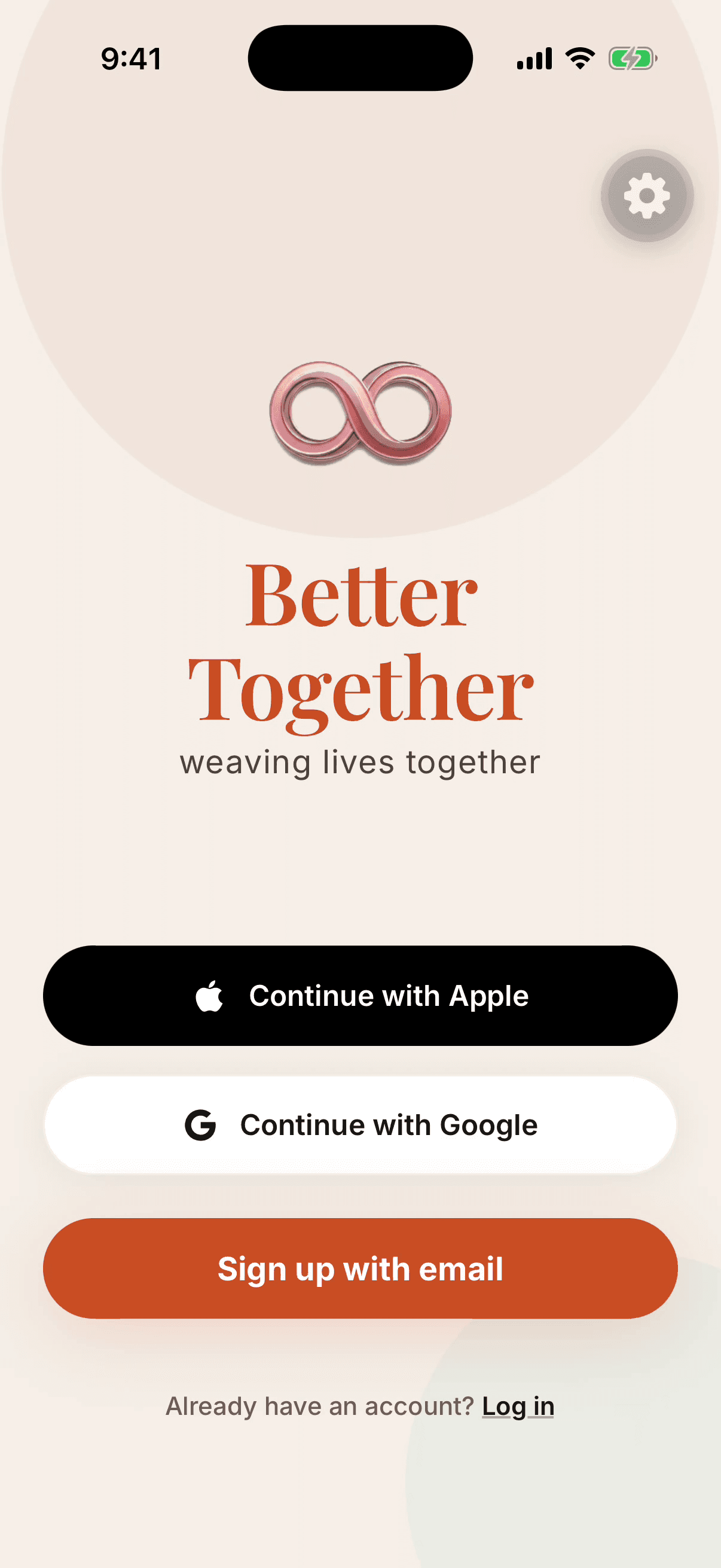
Welcome back

Sign in to continue your journey together.

Email

alex@example.com

Password

••••••••

Sign In
Continue with Apple
Continue with Google
01Access

Sign in or create account

Route/(auth)/login
Sourceapp/(auth)/login.tsx
StatusNative screen

User action: Enter email/password or choose Apple/Google.

System response: Authenticates the user and restores their existing relationship state.

Next step: New users continue into onboarding. Returning users land on Home.

Screen goal

Get the user into a known account state before showing private relationship data.

Why: Pairing, sealed answers, partner chat, and the shared garden all depend on a trusted identity and restored session.

Functions available

  • Sign in with email/password, Apple, or Google.
  • Restore an existing Supabase Auth session.
  • Route returning users to Home and new users into onboarding.
  • Show authentication errors without exposing raw provider details.

API / data touchpoints

  • Supabase Auth session via lib/supabase.
  • User/profile lookup before deciding paired vs unpaired state.
  • Expo Router auth route: app/(auth)/login.tsx.

Logical paths

  • Authenticated and paired -> /(tabs)/index.
  • Authenticated but unpaired -> onboarding and invite.
  • Invalid credentials -> stay on login with recoverable error.
  • Provider auth cancelled -> return to the login choices.

Actual app copy: Welcome back. Sign in to continue your journey together.

Choose connection mode app screen
02Onboarding

Choose connection mode

Route/(auth)/onboarding/step0-mode
Sourceapp/(auth)/onboarding/step0-mode.tsx
StatusNative screen

User action: Choose A partner or A friend.

System response: The app tailors language, features, and invitation framing.

Next step: Continue through personalization and invite.

Screen goal

Set the relationship mode so the product can speak to the right use case.

Why: The app needs to know whether this is a partner or friend connection before it frames rituals, invite copy, and relationship language.

Functions available

  • Select A partner or A friend.
  • Persist the mode selection in onboarding state.
  • Continue forward or return to the previous onboarding step.

API / data touchpoints

  • Expo Router route: app/(auth)/onboarding/step0-mode.tsx.
  • Mode copy helpers in lib/mode/*.
  • Onboarding state that later informs invite and app language.

Logical paths

  • Partner mode -> couple onboarding copy and partner invite.
  • Friend mode -> softer connection copy and friend-friendly invite framing.
  • Back -> login/onboarding entry.

Actual options: A partner and A friend.

9:41

Connect with your partner

Send your partner a magic link.

Partner's email

sam@example.com

Send magic link
Copy invitation link
03Pairing

Invite partner

Route/(auth)/onboarding/step5-invite
Sourceapp/(auth)/onboarding/step5-invite.tsx + app/(modals)/partner-invite.tsx
StatusNative screen

User action: Enter partner email, send a magic link, or copy/share the invite.

System response: The app saves the relationship slot and accepts the partner when the link is opened.

Next step: Once paired, both users share the same relationship garden.

Screen goal

Create the two-person relationship so the shared garden can exist.

Why: Better Together becomes meaningful when both people are connected; this screen turns a solo account into a shared relationship.

Functions available

  • Enter partner email.
  • Generate or reuse an active invite token.
  • Send invite email through the verified app API.
  • Copy/share the magic link when email is not enough.

API / data touchpoints

  • lib/partner.ts sendPartnerInvite().
  • Supabase tables: users and partner_invite_tokens.
  • POST /api/partner/send-invite-email via EXPO_PUBLIC_API_URL.
  • RPC accept_partner_invite when the partner opens the link.

Logical paths

  • Valid email + token created -> email/magic link sent.
  • Already linked -> stop with already-linked error.
  • Same user email -> stop with self-invite error.
  • Partner accepts token -> both users share one relationship.

Actual copy: Connect with your partner. Send your partner a magic link.

Daily ritual

Home makes the relationship actionable in two minutes.

This is the daily loop: greeting, pulse, sealed answer, reveal, bonsai progress, week entry, and quick actions.

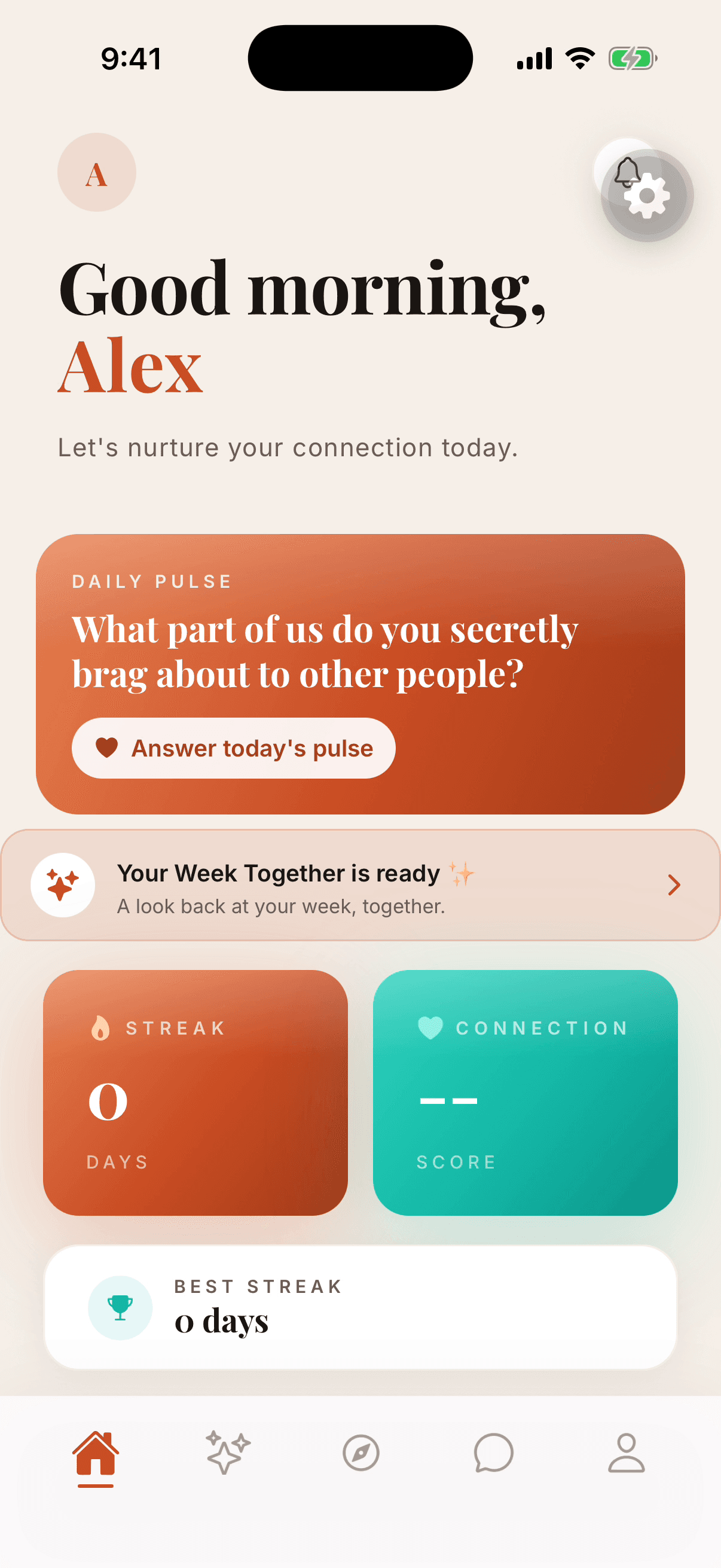
Home dashboard app screen
04Daily entry

Home dashboard

Route/(tabs)/index
Sourceapp/(tabs)/index.tsx
StatusNative tab

User action: Open the app and tap Daily Pulse, Week Together, Date Shop, or message partner.

System response: Shows greeting, Daily Pulse, bonsai, effort, garden storyboard, date shop, streak, and quick actions.

Next step: The strongest default path is answering today's pulse.

Screen goal

Put the highest-value next action in front of the user in the first few seconds.

Why: Home should make the relationship feel alive without making the user hunt for the Daily Pulse, bonsai, date ideas, or weekly recap.

Functions available

  • Open Daily Pulse, Week Together, Date Shop, bonsai, chat, and quick actions.
  • Show greeting, progress, current question, bonsai status, and next ritual.
  • Surface travel/sponsor opportunities without making the page feel like ads.

API / data touchpoints

  • app/(tabs)/index.tsx.
  • components/pulse/PulseCard.tsx.
  • components/bonsai/BonsaiWidget.tsx.
  • components/garden/GardenStoryboardCard.tsx.
  • components/opportunities/OpportunitiesCarousel.tsx.

Logical paths

  • Pulse unanswered -> answer today's pulse.
  • Pulse sealed -> wait for partner or open status card.
  • Reveal ready -> open pulse reveal.
  • Week ready -> open Week Together.
  • Travel intent -> open Date Shop or opportunity carousel.

Actual app greeting: Good morning, Alex. Let's nurture your connection today.

Answer today's Daily Pulse app screen
05Private first

Answer today's Daily Pulse

Route/(modals)/pulse
Sourceapp/(modals)/pulse.tsx + components/pulse/PulseCard.tsx
StatusNative modal

User action: Pick a feeling, write an answer, then tap Seal my pulse.

System response: The answer stays sealed until both partners answer.

Next step: When both have answered, the reveal unlocks.

Screen goal

Capture one honest answer privately before the couple sees each other.

Why: The double-blind answer creates safety: no one can perform for the other person's answer or peek early.

Functions available

  • Show today's prompt.
  • Capture mood and written answer.
  • Seal the answer.
  • Handle duplicate same-day submissions gracefully.

API / data touchpoints

  • lib/pulse/engine.ts submitPulse().
  • Supabase table: pulse_entries.
  • Supabase RPC: complete_couple_pulse.
  • stores/pulse.ts for UI state.

Logical paths

  • Solo/no partner -> save answer without shared reveal.
  • Partner has not answered -> sealed waiting state.
  • Both answered -> revealUnlocked true.
  • Duplicate answer -> fetch existing entry instead of hard failing.

Actual privacy hint: Sealed until your partner answers too - no peeking, for either of you.

9:41

The reveal

You both answered.

You

I brag that we keep choosing each other.

Sam

I brag about how safe you make home feel.

Days together

147

06Shared moment

Reveal together

Route/(modals)/pulse-reveal
Sourceapp/(modals)/pulse-reveal.tsx
StatusNative modal

User action: Open the reveal after both people answer.

System response: Both answers and feelings are shown side by side with a small celebration.

Next step: The answer contributes to the relationship's growth signals.

Screen goal

Turn two private answers into one shared conversation moment.

Why: The reveal is the emotional payoff of the ritual and the bridge into growth, streak, and watering state.

Functions available

  • Display both answers only after both people are in.
  • Show both feelings side by side.
  • Trigger celebration and growth feedback.
  • Hand off pair-completion data to bonsai state.

API / data touchpoints

  • app/(modals)/pulse-reveal.tsx.
  • submitPulse() pairCompleted and bonsaiGrowthPoints result.
  • stores/bonsai.ts pairCompleted().
  • Supabase RPC complete_couple_pulse owns streak and watering.

Logical paths

  • Reveal ready -> show both answers.
  • Not ready -> sealed/waiting state remains on PulseCard.
  • Pair completed -> bonsai refresh and watering ceremony flag.
  • Back -> Home with updated pulse state.

Actual route includes confetti and partner-card reveal behavior.

The living garden

Daily actions turn into water, roots, and a tree both people can tend.

The native app already has a Garden Storyboard card, bonsai modal, and watering ceremony. This is the clearest product story for the marketing site and app preview.

9:41

Garden story

The tree drinks.

Pulse - Water - Travel - Co-Pilot - Week

One card advances through the app's relationship loop.

07Progression

Garden storyboard card

Route/(tabs)/index
Sourcecomponents/garden/GardenStoryboardCard.tsx
StatusNative home card

User action: Tap one of the five story chips or let the card auto-advance.

System response: Shows Pulse, The tree drinks, Travel and dates, Bestie and Ace, Week Together.

Next step: Each chip routes into the relevant modal.

Screen goal

Explain the app as a living loop rather than a list of disconnected tools.

Why: The garden metaphor helps users understand how daily answers, travel, coaching, and weekly rituals all feed one shared relationship.

Functions available

  • Auto-advance through story chips.
  • Let the user tap a chip to jump into a feature.
  • Preview Pulse, tree growth, Travel, Bestie/Ace, and Week Together.

API / data touchpoints

  • components/garden/GardenStoryboardCard.tsx.
  • Native navigation targets for pulse, bonsai, date shop, copilot, and week.
  • Home state from app/(tabs)/index.tsx.

Logical paths

  • Pulse chip -> Daily Pulse.
  • Tree chip -> Bonsai modal.
  • Travel chip -> Date Shop or travel surface.
  • Bestie/Ace chip -> Co-Pilot.
  • Week chip -> weekly report.

The card auto-advances about every 3.6 seconds in the native app.

9:41

Our bonsai

Two trunks, one canopy.

82%

Your cup

74%

Sam's cup

08Growth object

Our Bonsai

Route/(modals)/bonsai
Sourceapp/(modals)/bonsai.tsx + components/bonsai/BonsaiWidget.tsx
StatusNative modal

User action: Tap the bonsai widget to inspect stage, water, acts of love, and real-bonsai claim status.

System response: Shows growth stage, water chips for each partner, recent acts, and claim path at 100 days.

Next step: User can acknowledge an act or claim the real bonsai when eligible.

Screen goal

Make relationship progress visible every time the couple opens the app.

Why: The tree is the durable visual memory of whether both people have been tending the relationship.

Functions available

  • Show stage, water, growth points, and recent acts.
  • Open the full bonsai modal from Home.
  • Refresh tree/deed state after pulse completion or logged acts.
  • Expose the 100-day real bonsai claim path.

API / data touchpoints

  • stores/bonsai.ts useBonsaiStore.
  • lib/bonsai/engine.ts getBonsaiSnapshot() and nourishBonsai().
  • lib/bonsai/growth.ts resolveGrowthFromPoints().
  • components/deeds/DeedLogger.tsx and lib/deeds/engine.ts.

Logical paths

  • Healthy water/growth -> stronger tree state.
  • No recent watering -> thirsty/quiet state.
  • Deed logged or affirmed -> refresh deeds and tree.
  • 100-day milestone -> claim real bonsai path.

Actual card eyebrow: OUR BONSAI.

Watering ceremony app screen
09Weekly ritual

Watering ceremony

Route/(modals)/watering-ceremony
Sourceapp/(modals)/watering-ceremony.tsx
StatusNative modal

User action: Open watering night, review both cups, then press and hold to pour.

System response: The tree drinks only when the ritual is completed.

Next step: After pouring, continue into Week Together.

Screen goal

Make the weekly ritual feel like both people are pouring into one shared thing.

Why: The ceremony explains the cup metaphor visually and makes growth feel earned, not automatic.

Functions available

  • Review each person's cup.
  • Press and hold to pour.
  • Animate the tree receiving water.
  • Clear the watering flag after the ceremony finishes.

API / data touchpoints

  • app/(modals)/watering-ceremony.tsx.
  • components/bonsai/WateringCeremony.tsx.
  • stores/bonsai.ts wateringJustLanded and clearWateringFlag().
  • Server-side pair completion from complete_couple_pulse.

Logical paths

  • Fresh pair completion -> ceremony available.
  • Hold completes -> tree drinks and returns to recap/home.
  • Dismiss -> preserve app state without granting extra growth.
  • Reduced motion -> quieter ceremony.

Actual flagship copy: Water something every day. Water us every week.

Travel and sponsor layer

Travel sits near the front because it is both useful to couples and sponsor-friendly.

The app has a Date Shop, opportunity carousel, and sponsored partner-offer card. These are the screens sponsors should understand first.

9:41

The Date Shop

Every date, one tap away.

AllOutdoorsDiningAt Home

Sunset Beach Walk

Free - 1 hr

Cook a New Recipe Together

Budget-friendly - 2 hrs

Boutique hotel stay

Partner

Partner offer

10Browse

The Date Shop

Route/(modals)/date-shop
Sourceapp/(modals)/date-shop.tsx
StatusNative modal

User action: Browse occasion rows, category chips, and city chips.

System response: Ranks date ideas for the couple and logs view/tap/book_intent events.

Next step: Open a date card, plan the date, or add it to the week.

Screen goal

Turn travel and date intent into real experiences couples can choose.

Why: This is the sponsor-friendly layer: useful suggestions first, paid placements only when they fit the couple's intent.

Functions available

  • Browse category chips and city chips.
  • Open a date idea.
  • Plan, save, or add a date to the week.
  • Record view, tap, and book-intent analytics.

API / data touchpoints

  • app/(modals)/date-shop.tsx.
  • lib/shop/browse.ts and lib/shop/engine.ts.
  • lib/analytics/events.ts track().
  • Future sponsor inventory and local partner data.

Logical paths

  • Casual browse -> curated idea rows.
  • Travel/date-night intent -> relevant opportunity card.
  • Book intent -> sponsor or planning flow.
  • No fit -> organic date idea still appears.

Actual subtitle: Every date, one tap away.

9:41

Partner offer

A night away, close by.

Travel

Vineyard weekend starter

Why this fits you two - slow mornings, local food, and one easy booking path.

See the offer
11Sponsors

Opportunities for you two

Route/(modals)/opportunity-discover
Sourcecomponents/opportunities/OpportunitiesCarousel.tsx + components/opportunities/OpportunityCard.tsx
StatusNative carousel

User action: Swipe the carousel, tap a partner offer, bookmark, or share.

System response: Tracks engagement and opens the opportunity detail surface.

Next step: The couple can redeem, plan, save, or send the opportunity.

Screen goal

Show sponsor opportunities as native relationship moments, not banner ads.

Why: The couple should feel like Better Together found the right memory for them, while sponsors get measurable intent.

Functions available

  • Swipe opportunity cards.
  • Open offer detail.
  • Bookmark, share, plan, or redeem.
  • Track sponsor engagement events.

API / data touchpoints

  • components/opportunities/OpportunitiesCarousel.tsx.
  • components/opportunities/OpportunityCard.tsx.
  • lib/analytics/events.ts app_events.
  • Sponsor campaign and redemption data model to be wired as inventory matures.

Logical paths

  • Interested -> detail, plan, redeem, or save.
  • Not interested -> swipe to next card.
  • Shared with partner -> partner notification/chat path.
  • Redeemed -> sponsor reporting path.

Actual carousel title: Opportunities for you two.

9:41

Explore

Find the next useful thing.

Date Ideas

Date Planner, Date Nights, Micro Date

Grow Together

Challenges, quizzes, goals

Communicate

AI Coach, voice check-in, repair

Community

Stories, groups, inspiration

12All paths

Explore library

Route/(tabs)/activities
Sourceapp/(tabs)/activities.tsx
StatusNative tab

User action: Switch categories: Date Ideas, Grow Together, Communicate, Intimacy, Community.

System response: Shows feature rows like Date Planner, Date Nights, Micro Date, Couple Challenges, AI Coach, and Voice Check-in.

Next step: Tap any feature to open its modal or section.

Screen goal

Give users a complete library without letting it overtake the daily ritual.

Why: Explore is for deliberate browsing; Home should still be the daily relationship operating system.

Functions available

  • Switch between relationship categories.
  • Open feature rows and modal surfaces.
  • Discover Date Planner, Date Nights, Micro Date, Couple Challenges, AI Coach, and Voice Check-in.

API / data touchpoints

  • app/(tabs)/activities.tsx.
  • lib/features/catalog.ts for feature/category data.
  • Supabase feature_catalog and feature_categories when loaded dynamically.

Logical paths

  • Date Ideas -> date planning surfaces.
  • Grow Together -> challenge and goal surfaces.
  • Communicate -> AI Coach/repair/voice check-in.
  • Community -> stories/groups/inspiration surfaces.

This is the native Explore tab, not the older marketing feature grid.

AI Co-Pilot

Bestie and Ace should feel like a native coaching conversation, not a static ad screen.

The native app now has a Co-Pilot modal, persona composer, AI Coach tab, communication coach, image context, voice context, and send interaction.

Bestie and Ace composer app screen
13Interactive

Bestie and Ace composer

Route/(modals)/copilot
Sourceapp/(modals)/copilot.tsx + components/copilot/CopilotPersonaComposer.tsx
StatusNative modal

User action: Toggle Bestie/Ace, attach screenshot, add voice note, type a message, or send.

System response: Returns a persona-specific response and keeps the context attached.

Next step: The user can coach a message, act on a suggestion, or open communication coach.

Screen goal

Let the user get private coaching with the right voice for the moment.

Why: Bestie and Ace are easier to understand when the UI behaves like a real native conversation with text, voice, and image context.

Functions available

  • Toggle Bestie or Ace.
  • Type and send a message.
  • Attach screenshot/image context.
  • Add voice note context.
  • Return persona-specific guidance.

API / data touchpoints

  • app/(modals)/copilot.tsx.
  • components/copilot/CopilotPersonaComposer.tsx.
  • stores/copilot.ts coach() and suggestion actions.
  • POST /api/copilot/coach via serverFetch().
  • lib/chat/media-upload.ts for chat media storage patterns.

Logical paths

  • Bestie selected -> tender, emotionally fluent response.
  • Ace selected -> direct next move.
  • Image attached -> response considers screenshot context.
  • Voice attached -> response considers spoken context/transcript.
  • Send empty -> no-op/disabled state.

Actual personas: Bestie = Tenderness first. Ace = Direct next move.

9:41

AI Coach

What do you need help with?

How to apologize
Date night ideas
Conflict help
Show appreciation
Help me repair after a tense morning.
Start with ownership, then make one small invitation to reconnect.
14Conversation

AI Coach tab

Route/(tabs)/ai-coach
Sourceapp/(tabs)/ai-coach.tsx + components/AiCoachChat.tsx
StatusNative tab

User action: Choose a suggested prompt or type a relationship question.

System response: Streams a coaching response, handles quota states, and offers next actions.

Next step: User can send another question or open a coaching modal from a suggestion.

Screen goal

Give users a deeper coaching lane when a quick Co-Pilot response is not enough.

Why: AI Coach handles broader relationship questions, quotas, history, and next actions without crowding the Home screen.

Functions available

  • Choose suggested prompt.
  • Type a custom question.
  • Send to the AI coach.
  • Handle quota and subscription states.
  • Continue or clear conversation history.

API / data touchpoints

  • app/(tabs)/ai-coach.tsx.
  • components/AiCoachChat.tsx.
  • lib/server-api.ts askAiCoach().
  • POST /api/ai-coach/ask.
  • GET/DELETE /api/ai-coach/history.
  • lib/ai/gateway.ts usage and quota tracking.

Logical paths

  • Prompt tapped -> prefilled/submitted coach question.
  • Message sent -> streaming or returned coach response.
  • Quota reached -> upsell/subscription state.
  • History open -> previous messages.

Actual suggestions include How to apologize, Date night ideas, Conflict help, Show appreciation, Communication tips, and Build trust.

Week together and account

The app closes the loop with a weekly recap and keeps settings secondary.

These screens are useful for retention and support, but they should be quieter than the Daily Pulse, Garden, Travel, and Co-Pilot story.

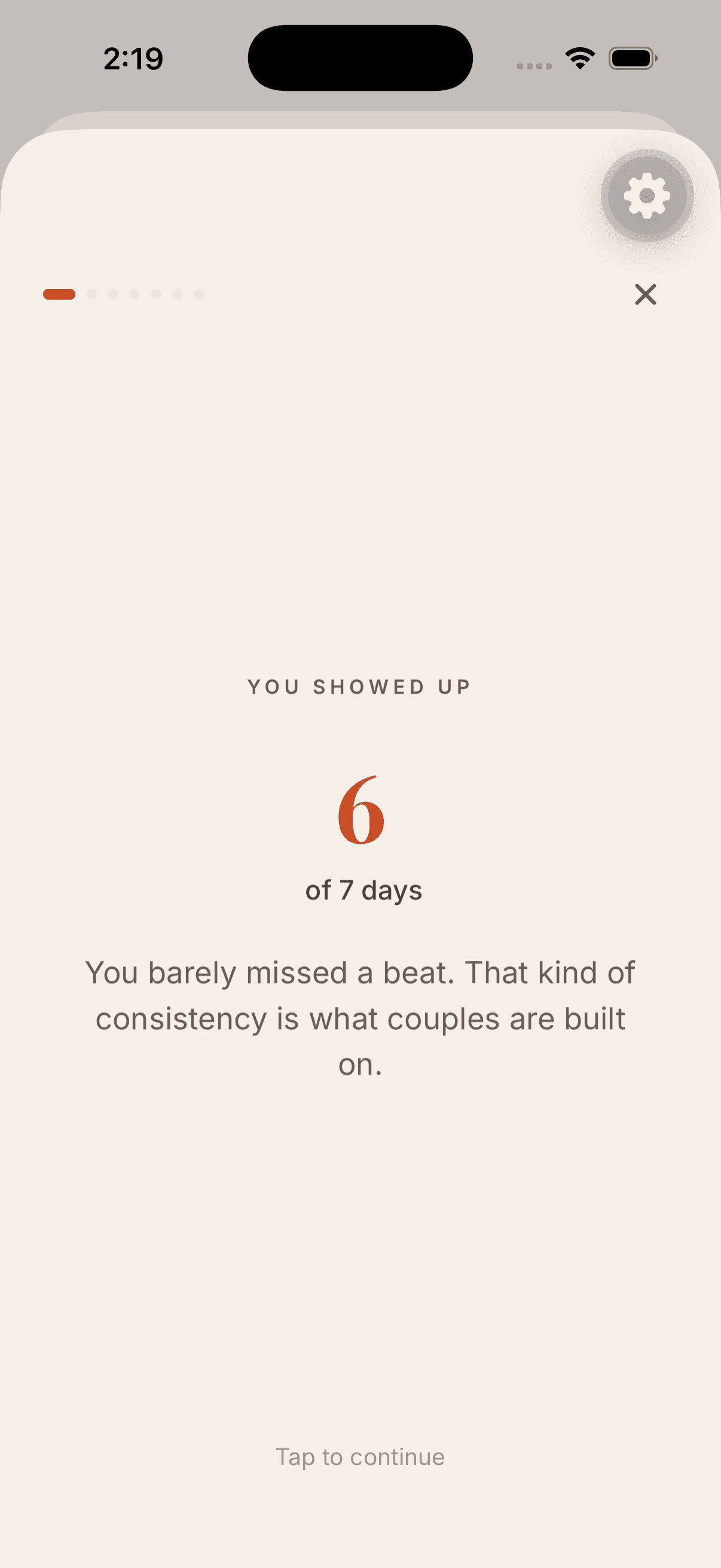
Week Together app screen
15Recap

Week Together

Route/(modals)/weekly-report and /(modals)/week-together
Sourceapp/(modals)/weekly-report.tsx + app/(modals)/week-together.tsx
StatusNative modal

User action: Open the weekly recap when the home card says it is ready.

System response: Summarizes how both people showed up and prompts the next ritual.

Next step: Return to Home or move into watering night.

Screen goal

Close the relationship loop with a recap that points to the next ritual.

Why: A weekly recap makes the couple notice progress and gives them a reason to keep returning beyond a daily question.

Functions available

  • Show weekly summary.
  • Count pulses, acts, repairs, dates, and growth signals.
  • Prompt the next watering or weekly conversation.
  • Return the user to Home with a clear next action.

API / data touchpoints

  • app/(modals)/weekly-report.tsx.
  • app/(modals)/week-together.tsx.
  • Home weekly card from app/(tabs)/index.tsx.
  • Pulse, deeds, bonsai, and opportunity event history.

Logical paths

  • Week ready -> open recap.
  • Watering due -> enter watering ceremony.
  • No enough activity -> softer recap with next prompt.
  • Done -> return Home.

Actual home card: Your Week Together is ready.

9:41

Profile

A

Alex

Connected with Sam

Notifications
Invite partner
Privacy
16Settings

Profile and preferences

Route/(tabs)/profile
Sourceapp/(tabs)/profile.tsx
StatusNative tab

User action: Update profile, notifications, partner invite, subscription, privacy, or support.

System response: Stores account-level settings without interrupting the relationship loop.

Next step: Return to Home, Explore, Chat, or AI Coach from the tab bar.

Screen goal

Keep account, privacy, partner, and subscription controls available but secondary.

Why: Settings should support trust and control without competing with the core relationship ritual.

Functions available

  • Edit profile.
  • Manage notifications.
  • Invite or manage partner.
  • Open subscription, privacy, support, and account actions.
  • Sign out.

API / data touchpoints

  • app/(tabs)/profile.tsx.
  • Supabase Auth user/session.
  • User profile and notification preference rows.
  • Subscription helpers in lib/server-api.ts.
  • Privacy/support routes from the marketing site and app settings.

Logical paths

  • Profile edit -> save user data.
  • Invite/manage partner -> partner invite flow.
  • Subscription -> checkout or portal.
  • Privacy/support -> trust content.
  • Sign out -> auth screen.

Use as a support/account surface, not as a marketing hero.

Native source evidence

Files used to build this storyboard.

These are the app repo files the storyboard is grounded in. If a screen changes in the app, this page should be refreshed from that source before using it as a design reference.

assets/store/app-preview-storyboard.md
assets/store/screenshot-captions.json
app/(tabs)/index.tsx
app/(tabs)/ai-coach.tsx
app/(tabs)/activities.tsx
app/(tabs)/partner-chat.tsx
app/(tabs)/profile.tsx
app/(auth)/login.tsx
app/(auth)/onboarding/step0-mode.tsx
app/(auth)/onboarding/step5-invite.tsx
app/(modals)/pulse.tsx
app/(modals)/pulse-reveal.tsx
app/(modals)/watering-ceremony.tsx
app/(modals)/bonsai.tsx
app/(modals)/date-shop.tsx
app/(modals)/opportunity-discover.tsx
app/(modals)/copilot.tsx
components/copilot/CopilotPersonaComposer.tsx
components/garden/GardenStoryboardCard.tsx
components/opportunities/OpportunitiesCarousel.tsx
lib/server-api.ts
lib/partner.ts
lib/pulse/engine.ts
stores/bonsai.ts
stores/copilot.ts
lib/copilot/engine.ts